

You spent good money on a sign. It looks great up close — clean logo, sharp colors, professional finish. But if the letters are too small for someone driving past to actually read, it’s not doing its job. That’s the most common mistake we see, and it comes down to one thing: letter height.
This is the question we walk through with business owners every week. After 30-plus years of designing signs on the Monterey Peninsula, we’ve seen more undersized signs than we can count. Good businesses with nice logos and beautiful colors — and letters so small that nobody driving past can actually read them. The sign exists. It just doesn’t work.
Here’s how to make sure yours does.
The Rule Every Business Owner Should Know
The sign industry’s baseline formula is straightforward:
One inch of capital letter height is readable at approximately 10 feet of viewing distance.
This comes from research by the United States Sign Council (USSC), and it’s been the standard for decades. A 10-inch letter is readable at 100 feet. A 24-inch letter is readable at 240 feet. Simple math.
But there’s a critical distinction most people miss. “Readable” means a person with 20/20 vision can identify the words under ideal conditions — good lighting, clean sign face, clear sky. “Visible” — meaning someone can tell a sign exists — extends much farther. But a sign that’s visible without being readable is just a blur. It’s not telling anyone your name or what you do.
That’s why the USSC recommends designing to the “best impact” column, not the bare minimum. The minimum leaves zero margin for real-world conditions: aging eyes, a dirty sign face, glare, or — if you’re on the Monterey Peninsula — fog.
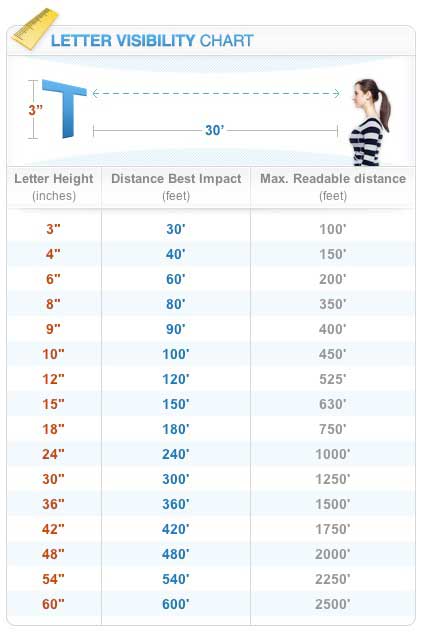
Letter Height by Viewing Distance
Here’s the data from the USSC research, and this is the chart worth bookmarking:
| Viewing Distance | Minimum Readable Letter Height | Best Impact Letter Height |
|---|---|---|
| 50 feet | 3 inches | 5–6 inches |
| 100 feet | 5–6 inches | 8–10 inches |
| 150 feet | 8 inches | 12–15 inches |
| 200 feet | 10–12 inches | 15–18 inches |
| 300 feet | 15 inches | 24 inches |
| 400 feet | 20–24 inches | 30–36 inches |
| 500 feet | 24–30 inches | 36–48 inches |
| 750 feet | 36–40 inches | 48–60 inches |
| 1,000 feet | 48+ inches | 60–72+ inches |
Always design to the “Best Impact” column. The minimum is a theoretical floor. Your sign doesn’t live in a lab — it lives on a road with traffic, weather, and people who aren’t looking for it.
Why Vehicle Speed Changes Everything
The distance chart is useful, but it only tells half the story. The other half is time — specifically, how many seconds a driver has to see your sign, read it, understand it, and react.
Here’s what’s happening in real time behind the wheel:
| Vehicle Speed | Distance Covered Per Second |
|---|---|
| 25 mph (residential / downtown) | 37 feet per second |
| 35 mph (city arterial) | 51 feet per second |
| 45 mph (commercial corridor) | 66 feet per second |
| 55 mph (highway) | 81 feet per second |
| 65 mph (freeway) | 95 feet per second |
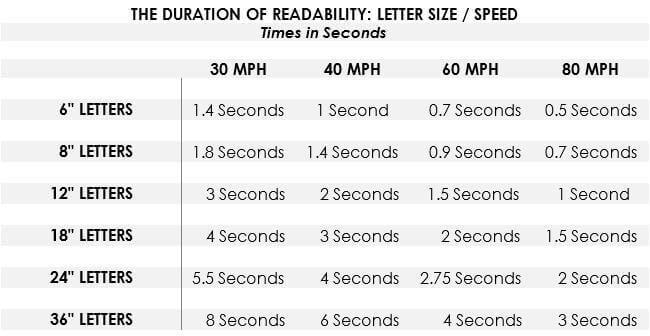
A driver needs roughly five seconds to detect a sign, read the message, decide what to do, and physically react — brake, signal, turn in. That’s the industry planning standard, and it’s generous. Complex wayfinding decisions can take eight seconds.
Multiply speed by five seconds and you get the distance your sign must be readable from:
| Speed | Required Readable Distance | Recommended Letter Height |
|---|---|---|
| 25 mph | 185 feet | 12–15 inches |
| 35 mph | 255 feet | 18–24 inches |
| 45 mph | 330 feet | 24–36 inches |
| 55 mph | 405 feet | 30–42 inches |
| 65 mph | 475 feet | 36–48 inches |
Here’s the gut check: if your sign is on a 45 mph road and your letters are 8 inches tall, drivers literally cannot read your sign before they pass it. You paid for a sign that nobody can use.
Highway vs. City Street vs. Pedestrian Area
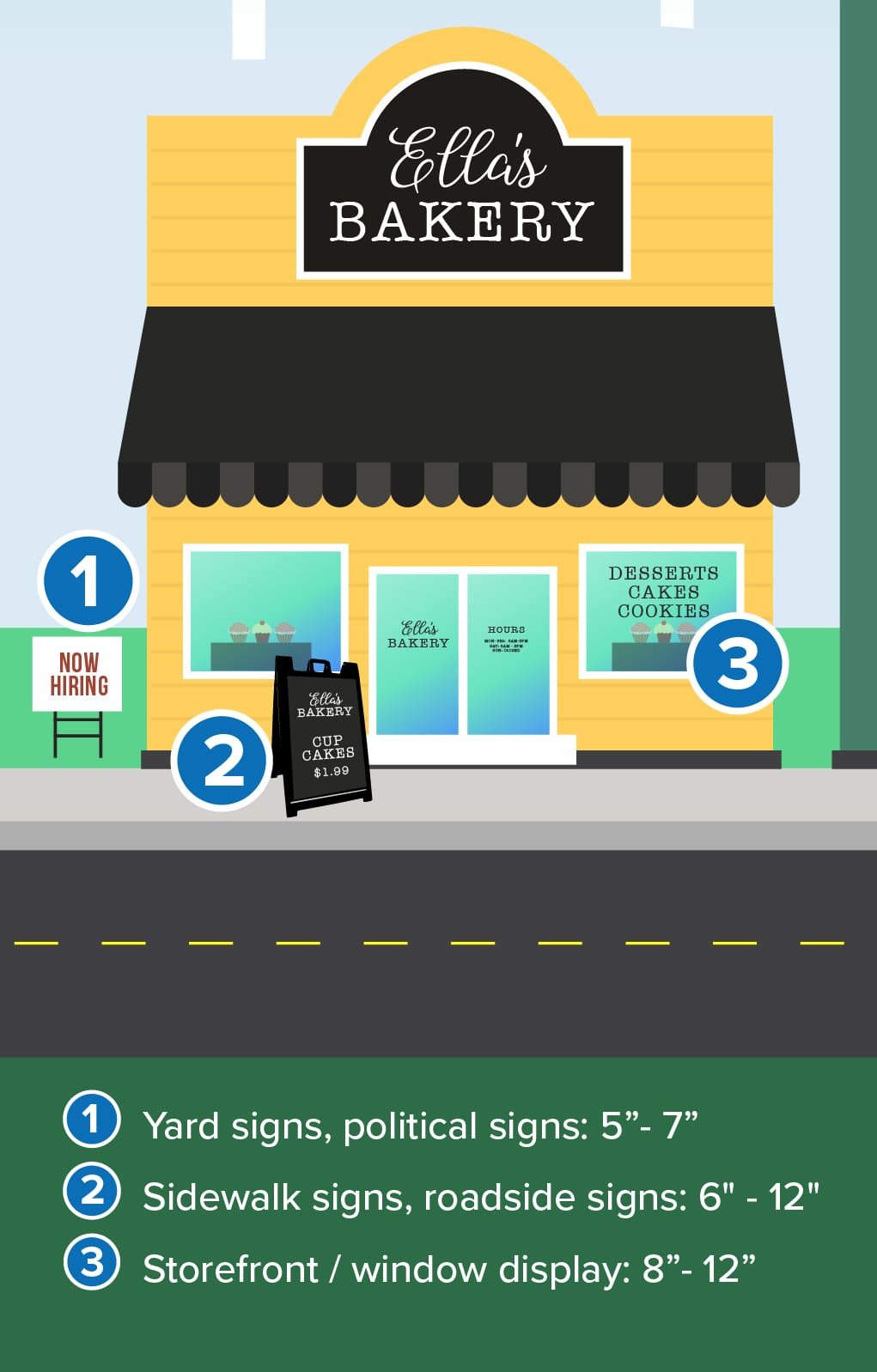
The same business would need completely different letter sizes depending on location. A boutique on Ocean Avenue in Carmel might do beautifully with 4-inch hand-carved letters — pedestrians are strolling at walking pace, stopping to look in windows. That same 4-inch letter on Highway 1 would be invisible.
This is why context drives every sizing decision we make, not a one-size-fits-all chart.
Wayfinding Signs: Why Less Is More
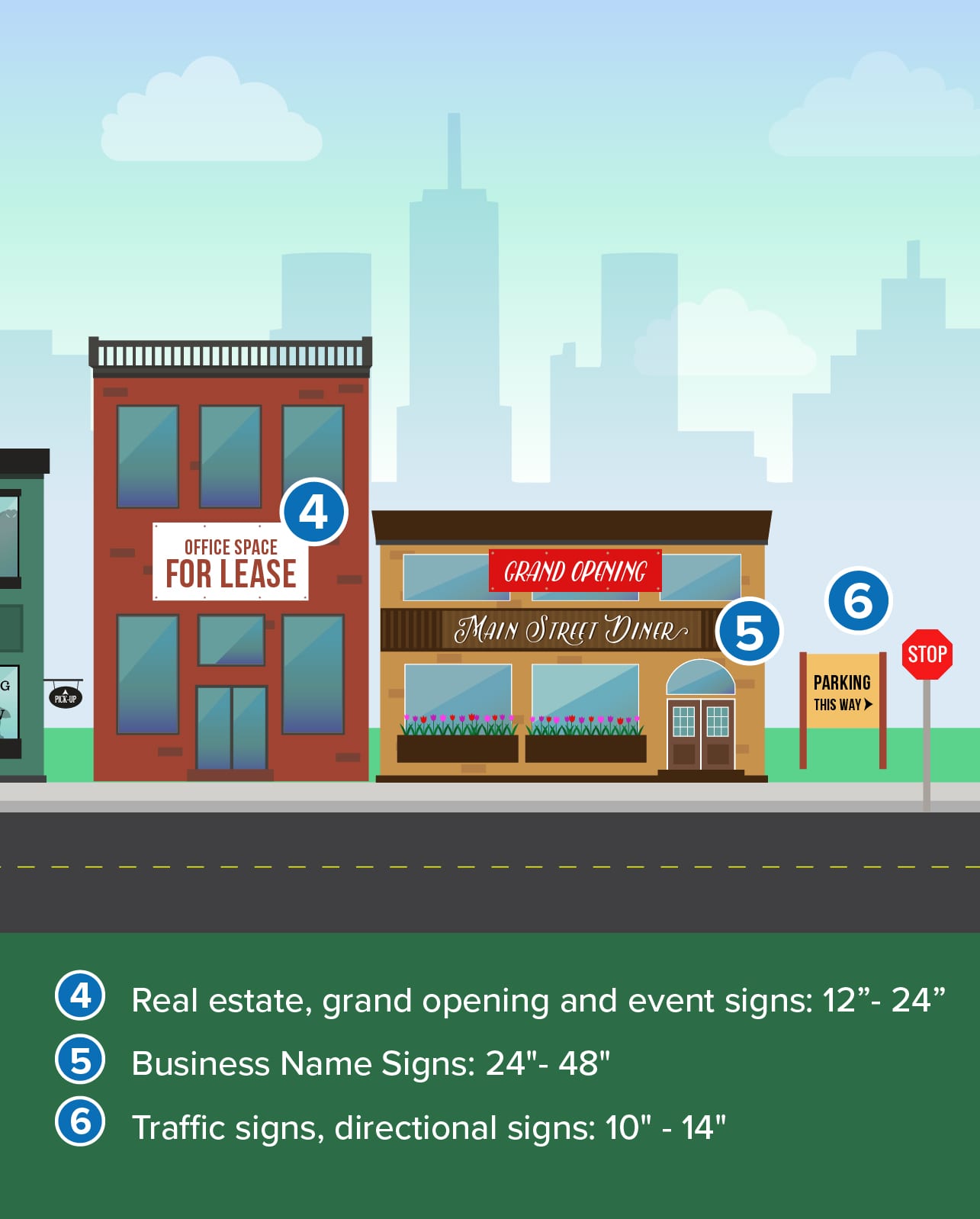
If you manage a property with wayfinding signage — a shopping center, resort, office campus, or HOA community — there’s a separate rule that matters just as much as letter height: limit each sign panel to four or five destinations, maximum.
This isn’t arbitrary. It’s grounded in cognitive science and backed by the federal Manual on Uniform Traffic Control Devices (MUTCD), which caps highway guide signs at three destinations per panel.
Here’s why the limit exists:
Cognitive load at speed. A driver can absorb three to five pieces of information from a sign before it’s behind them. More messages means none of them land.
Every destination you add shrinks the text. More messages on the same panel means smaller letters, which means shorter readable distance, which means less time to process. It’s a vicious cycle.
Overloaded signs get ignored. When a sign looks too complex to parse at a glance, drivers don’t slow down to study it — they skip it entirely. The sign becomes visual clutter, not a navigation tool.
The temptation in commercial projects is to list every tenant or destination on one panel. We’ve had that conversation with property managers many times. The answer is always a tiered system: a primary sign with major zones, then secondary signs within each zone with specific destinations. More signs, fewer messages per sign, better results.
Beyond Letter Size: What Else Affects Readability
Letter height is the foundation, but several other factors determine whether your sign actually gets read.
Contrast and Color
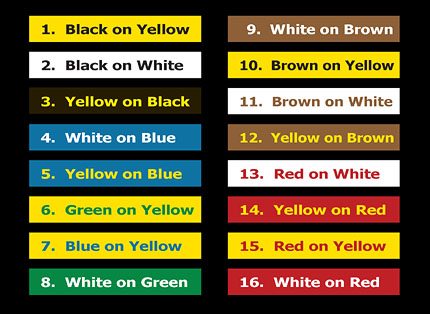
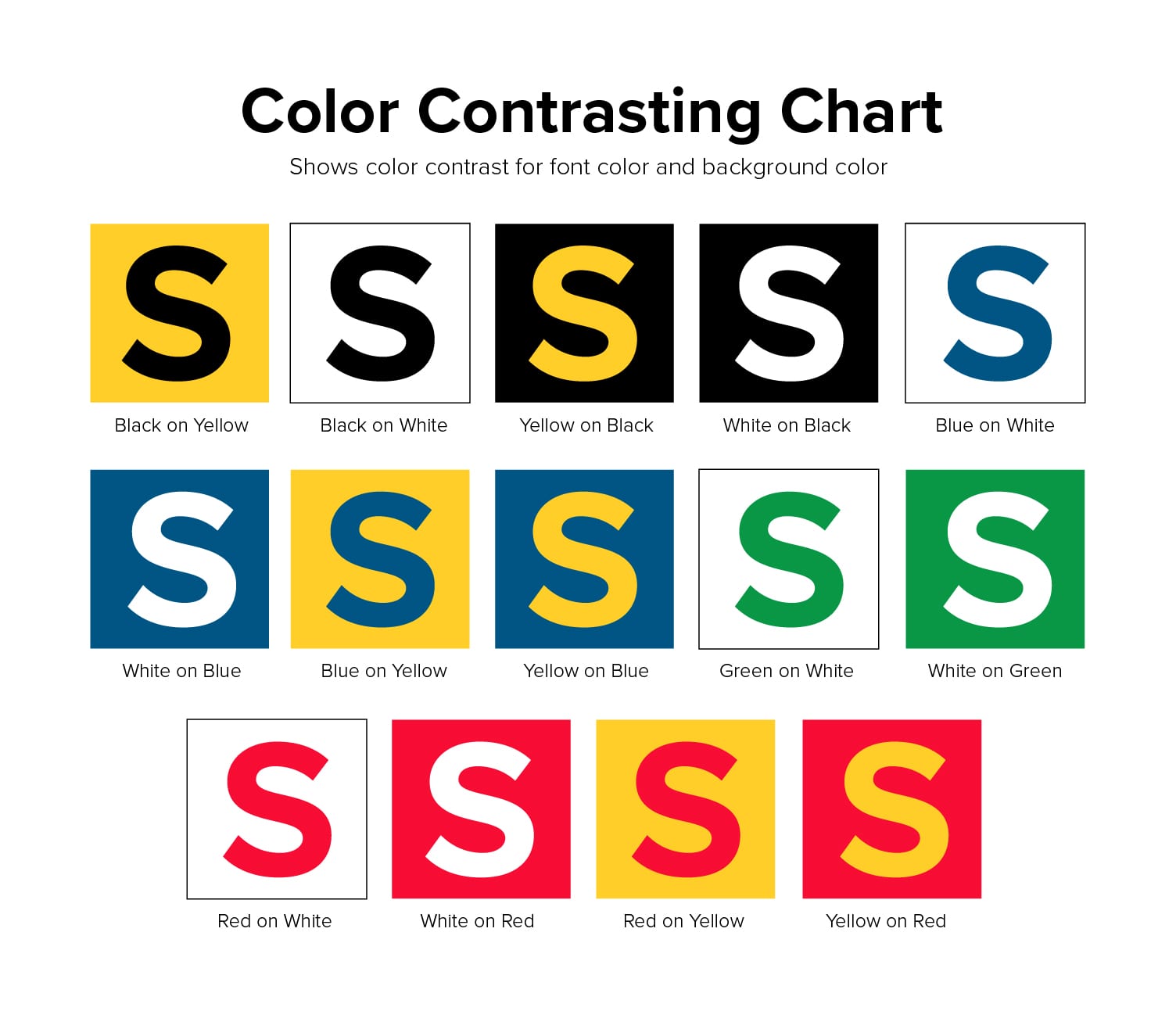
Not all color combinations are created equal. Here’s how they rank for visibility at distance, based on research by the Outdoor Advertising Association:
| Rank | Color Combination | Visibility Level |
|---|---|---|
| 1 | Black on yellow | Highest |
| 2 | Black on white | Very high |
| 3 | Yellow on black | Very high |
| 4 | White on blue | High |
| 5 | Green on white | High |
| 6 | Red on white | High |
| 7 | Blue on white | Moderate-high |
| 8 | White on green | Moderate-high |
| 9 | White on red | Moderate |
| 10 | White on black | Moderate |
The pattern is clear: high contrast wins. Dark letters on a light background are generally more readable in daylight. Light letters on a dark background work better for illuminated signs at night.
We regularly work with business owners whose brand colors happen to be low-contrast — think a medium blue logo on a gray background. The sign still needs to communicate. We find solutions that honor the brand while making sure the sign is legible, because a beautiful sign that blends into its own background isn’t helping anyone.
Font Selection
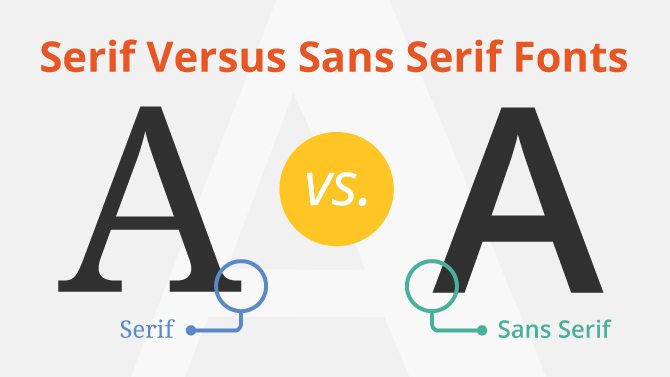
Sans-serif fonts outperform serif fonts for distance readability. Fonts like Helvetica, Futura, and Gotham have clean edges that stay distinct at a distance. Serif fonts — the ones with small decorative strokes at the endpoints — tend to blur together when viewed from far away.
Script and decorative fonts look elegant but dramatically reduce readability at speed. They’re fine for a tagline on a pedestrian-scale sign or a secondary line on a monument sign. They should never carry the primary message on a sign that needs to be read at 35-plus mph.
Letter spacing matters as much as font choice. Letters that are too tightly kerned merge into a blob at distance. This is a detail we adjust on every sign we produce — the spacing that looks right on a computer screen at arm’s length often needs to open up for a sign viewed from the road.
Illumination
An illuminated sign extends its readable distance by 20 to 40 percent in low-light conditions compared to a non-illuminated sign. Internal illumination — channel letters, lightbox signs — provides the most consistent visibility boost. External illumination from gooseneck lights or ground-mounted floods can work well, but poor fixture placement creates glare and shadows that actually hurt readability.
On the Monterey Peninsula, illumination isn’t just about nighttime visibility. It’s about fog. A backlit or internally illuminated sign cuts through marine haze in ways a non-illuminated painted sign simply cannot.
Sign Placement and Viewing Angle
A sign mounted flat against a building wall that runs parallel to the road is nearly invisible to approaching traffic. Drivers see it at such an extreme angle that the letters compress into narrow slivers. Perpendicular blade signs, angled monument signs, and V-shaped pylon signs solve this by presenting the sign face toward oncoming traffic.
Mounting height matters too. Vehicle-oriented signs need the bottom of the sign face at least six to eight feet above grade to clear parked cars. And a perfectly sized sign hidden behind a mature tree or a landscaped median is effectively invisible. This is why we always assess the site before recommending a design — a sign is only as good as its line of sight.
What This Means on the Monterey Peninsula
Everything above applies anywhere. Here’s where it gets specific to our area.
Fog changes the math. The Monterey Peninsula is one of the foggiest stretches of the California coast, and fog reduces sign visibility distance by 30 to 70 percent depending on density. A sign readable at 400 feet in clear conditions may only work from 150 feet in typical coastal fog. That’s why we size for fog, not sunshine. We build in a visibility buffer because the days when your sign needs to work hardest — peak tourist season, May through September — are exactly the days when fog is most common.
The Peninsula has wildly different traffic environments within a few miles. Here’s how we think about letter sizing by location:
| Location | Typical Speed | Context | Recommended Letter Height |
|---|---|---|---|
| Carmel village (Ocean Ave) | 15–25 mph | Pedestrian browsing | 3–8 inches |
| Cannery Row | 15–25 mph | Pedestrian + slow vehicle | 6–12 inches |
| Lighthouse Ave (Pacific Grove) | 25–30 mph | Neighborhood commercial | 10–18 inches |
| Del Monte Ave (Monterey) | 35 mph | Urban arterial | 18–24 inches |
| Fremont Street (Monterey) | 35–40 mph | Commercial corridor | 18–30 inches |
| Highway 1 commercial | 40–50 mph | Highway commercial | 24–36 inches |
| Highway 68 | 45–55 mph | Suburban connector | 30–42 inches |
| Highway 1 south (Big Sur) | 50–55 mph | Rural highway | 36–48 inches |
You won’t find this table in any generic letter-height guide. It’s built from three decades of designing signs on these specific roads, for these specific conditions.
Carmel is the exception that proves the rule. Carmel-by-the-Sea prohibits illuminated signs and limits sign area tightly. Every sign goes through planning commission design review. The restrictions work because Carmel’s commercial district is fundamentally pedestrian-scale — slow speeds, close viewing distances, shoppers who stop and look. But the design rules that work beautifully on Ocean Avenue would fail on Highway 1. Different context, different requirements.
Many Highway 1 businesses have undersized signs. We see this constantly — letters under 12 inches on a road where traffic moves at 45 mph. The business owner wonders why customers say “I drove past three times before I found you.” The math explains it. At 45 mph with 8-inch letters, a driver cannot read the sign before they pass it.
Getting Letter Size Right the First Time
A sign you paid for but nobody can read is the most expensive mistake in signage. The good news is that it’s completely avoidable with proper planning.
This is not a decision to make from a chart alone. The chart gives you the starting point, but every site has variables — viewing angle, obstructions, fog exposure, sign code restrictions, building orientation — that adjust the final recommendation. We visit the site, measure the real viewing distance, evaluate the traffic speed and sight lines, and factor in Peninsula conditions before recommending a letter height. It’s what 30-plus years of doing this work looks like.
If you’re planning a new sign, this is one of the first things we’ll discuss. And if you already have a sign that doesn’t seem to pull its weight, undersized letters might be the reason. Either way, we’re happy to take a look and give you a straight answer. Reach out anytime.

Leave A Comment